

Description
Download Archos Video RK APK – video player, multimedia player, Archos devices, RK processor, torrent streaming, network storage, subtitle downloader, Trakt scrobbler, Android TV, 3D video, VR support
Overview
Archos Video (RK) is a multimedia player application tailored specifically for Archos devices powered by RK processors. Designed to deliver a seamless entertainment experience, the app focuses on hardware-accelerated video decoding, ensuring smooth playback across a wide range of video formats. It is free to use and does not include advertisements or in-app purchases, making it an appealing choice for users seeking a clean, ad-free media experience.
The application is optimized for Archos hardware, enabling efficient playback of high-resolution content, including 3D videos and VR-compatible formats through Archos stereo virtual reality glasses or cardboard support. It supports playback from multiple sources, including local storage, external USB drives, network-attached storage, and previously downloaded torrent files. This versatility makes it suitable for both casual users and enthusiasts who manage large media libraries across different storage types.
Archos Video (RK) is particularly well-suited for users who rely on Archos tablets or media players as their primary entertainment devices. Its TV-friendly interface, remote control compatibility, and Android TV integration enhance usability in living room setups. The app also enables users to keep track of their viewing history via Trakt scrobbler integration, offering a personalized media tracking experience. With automatic metadata retrieval for movies and TV shows, including posters and backdrops, the app enhances the visual appeal of the media library.
Key Features & Capabilities
- Hardware-accelerated video decoding – Optimized for RK processor-based Archos devices, ensuring smooth playback of high-definition and complex video formats without excessive CPU load.
- Multi-source playback support – Allows users to play content from local storage, USB devices, network shares (SMB), and previously downloaded torrent files directly within the app.
- Network storage integration – Supports indexing of remote shared folders via SMB, enabling users to import and manage network-based media libraries seamlessly.
- Automatic metadata retrieval – Automatically fetches movie and TV show details, including posters, backdrops, and episode information, enriching the viewing experience.
- Integrated subtitle downloader – Enables automatic detection and download of subtitles in multiple languages for enhanced accessibility and viewing convenience.
- Torrent streaming functionality – Allows users to open and play torrent files that have already been downloaded, streamlining access to torrent-based media collections.
- TV-friendly interface – Features a remote control and keyboard-compatible UI, with full Android TV support for use on smart TVs and media centers.
- Trakt scrobbler integration – Tracks watched content and syncs viewing history with Trakt, helping users maintain a personalized media log.
- 3D and VR playback support – Offers side-by-side and top-bottom playback modes for 3D content, compatible with Archos stereo VR glasses or cardboard viewers.
- Flexible navigation – Supports both folder-based and library-based browsing, with hierarchical organization for TV shows by series, season, and episode.
User Interface, Workflow & Performance
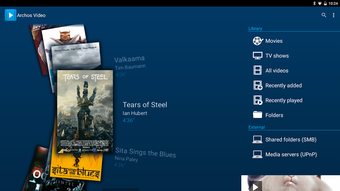
The user interface of Archos Video (RK) is designed with usability in mind, especially for home entertainment environments. The layout is clean and intuitive, with a focus on accessibility through remote controls and keyboard navigation. The app supports both library and folder-based browsing, allowing users to organize their media in a way that best fits their workflow.
Navigation is streamlined, with a hierarchical view for TV shows that enables quick access to specific episodes. The app’s design emphasizes visual clarity, displaying posters and backdrops for content, which enhances the overall media experience. The integration of metadata retrieval ensures that media items are presented with rich information, reducing the need for manual configuration.
Performance is optimized for RK processor-based devices, leveraging hardware acceleration to maintain smooth playback even with high-bitrate video files. The developer did not specify resource usage details, but the app’s lightweight size of 14.5 MB suggests efficient memory and CPU utilization. Stability is expected to be strong given the app’s targeted hardware compatibility and lack of ads or in-app purchases, which can sometimes impact performance.
Compatibility & System Requirements
Archos Video (RK) is designed exclusively for Archos devices equipped with RK processors. It is compatible with Android-based systems and runs on devices that meet the manufacturer’s specifications for these processors. The app has a file size of 14.5 MB, indicating a lightweight footprint that should not strain device storage.
Exact system requirements were not listed. The developer did not provide additional system requirements beyond the hardware compatibility with RK processors. As such, users should ensure their Archos device is based on an RK chipset before attempting installation. Compatibility information is limited to the intended device ecosystem, and support for non-Archos or non-RK devices is not confirmed.
Pros and Cons
Pros
- Free to use with no ads or in-app purchases
- Optimized for RK processor-based Archos devices
- Supports hardware-accelerated playback for smooth video performance
- Extensive media source support including USB, network, and torrents
- Integrated subtitle downloader and metadata retrieval
- TV-friendly interface with Android TV and remote control support
- Trakt scrobbler integration for viewing history tracking
- 3D and VR playback with Archos-compatible glasses
- Lightweight at 14.5 MB
Cons
- Exclusive to Archos devices with RK processors
- Limited to Android platform
- Exact system requirements not specified
- Not available for non-Archos hardware or other OS platforms
- May not support newer video codecs without updates
FAQ Section
Is Archos Video (RK) compatible with all Archos devices?
The app is specifically designed for Archos devices based on RK processors. Compatibility is limited to these models, and it may not function on Archos devices with different chipsets.
Can I use Archos Video (RK) on non-Archos Android devices?
Based on the available information, the application is intended for use only on Archos devices with RK processors. It is not officially supported on other Android devices.
Is the app safe to download and install?
Archos Video (RK) is developed by Archos, a known manufacturer of media devices. The app is free from ads and in-app purchases, reducing the risk of malicious content. However, users should ensure they download the APK from official or trusted sources.
Does the app support automatic subtitle downloads?
Yes, the app includes an integrated subtitle downloader that automatically detects and fetches subtitles for supported media files.
Can I stream content from my computer or network storage?
Yes, Archos Video (RK) supports network storage access via SMB, allowing users to import and play media from shared folders on computers or NAS devices within their network.
Final Thoughts
Archos Video (RK) delivers a focused, high-performance multimedia experience tailored to Archos users with RK processor-based devices. Its combination of hardware acceleration, multi-source playback, and rich feature set—including torrent streaming, metadata retrieval, and Trakt integration—makes it a standout choice for media enthusiasts. The app’s TV-friendly interface and support for 3D and VR content further extend its utility in home entertainment setups.
While its exclusivity to RK-based Archos devices limits broader appeal, users within this ecosystem will find the app to be a reliable, ad-free, and feature-rich video player. With a lightweight footprint and strong compatibility with networked storage and remote controls, it excels in delivering a seamless viewing experience.
For Archos owners with RK processors, this is the definitive media player for their devices. Download Archos Video (RK) now.
Guides & Tutorials for Archos Video RK APK
How to install Archos Video RK APK
- Click the Preview / Download button above.
- Once redirected, accept the terms and click Install.
- Wait for the Archos Video RK APK download to finish on your device.
How to use Archos Video RK APK
This software is primarily used for its core features described above. Open the app after installation to explore its capabilities.
User Reviews for Archos Video RK APK 0
No reviews found





